React19 Compiler - Improvements
How React19 Compiler is taking control of optimizations under the hood
React 19 Compiler
Since React 18, there have been many drastic changes on how we see React and how we perceive React. React has moved away from simply being a client-side SPA by introducing server-side functionalities. But in this blog, I want to focus on React-19 Complier which is now out of beta phase and brings its own sets of optimizations in react. This blog is about performance and optimizations now being done under the hood.
Before understanding this, we need to revist how React handles re-rendering.
State changes and Re-renders
Lets take a very simple example, where we have a component which host a child component. In the parent component, there is a button which alters the state of parent component, hence triggering the re-render. And as children are associated with that, with each re-render, the child component would also re-render. This was the default behavior of React engine.
import { Profiler, useState } from "react";
import SimpleSection from "./components/SimpleSection";
import "./App.css";

function App() {
  const [count, setCount] = useState(0);

  function onRender(
    id: string,
    phase: "mount" | "update" | "nested-update",
    actualDuration: number,
    baseDuration: number,
    startTime: number,
    commitTime: number,
  ) {
    console.log({
      id,
      phase,
      actualDuration,
      baseDuration,
      startTime,
      commitTime,
    });
  }

  return (
    <>
      <button onClick={() => setCount((c: number) => c + 1)}>
        Count: {count}
      </button>

      <Profiler id="SimpleSection" onRender={onRender}>
        <SimpleSection />
      </Profiler>

    </>
  );
}

export default App;
import styles from "./styles.module.css";
import heroImg from "../../assets/hero.png";

const SimpleSection = () => {
  console.log("Simple-Section rendered");

  return (
    <div>
      <h1 className={styles.heading}>Simple Section</h1>
      <p>
        Lorem ipsum dolor sit amet consectetur adipisicing elit. Facere quae
        numquam, nam doloribus illum odit. Quidem eveniet ad ducimus vitae id
        assumenda reiciendis unde corrupti quae? Quos numquam porro possimus.s
      </p>

      <div>
        <img src={heroImg} width={400} height={300} alt="hero-img" />
      </div>
    </div>
  );
};

export default SimpleSection;
Now, in this simple setup, we are tracking re-renders via onRender function in App.tsx and console statement in child component. As per original React, clicking button would increase the counter and hence trigger re-render of App.tsx, leading to re-rendering of Simple-Section indicated by onRender and console function.
Making use of Memo
Now, I make a very simple change where I enclode the child component in memo. This forces react to look for props and see if any there are any changes in virtual-DOM. If there are, the child component also re-renders. But if no props changes (for example, in this case, no props are passed), then there are no diffs and hence child component wont re-render. A small change is made in Simple-Section component.
import { memo } from "react";
import styles from "./styles.module.css";
import heroImg from "../../assets/hero.png";

const SimpleSection = () => {
  console.log("Simple-Section rendered");

  return (
    <div>
      <h1 className={styles.heading}>Simple Section</h1>
      <p>
        Lorem ipsum dolor sit amet consectetur adipisicing elit. Facere quae
        numquam, nam doloribus illum odit. Quidem eveniet ad ducimus vitae id
        assumenda reiciendis unde corrupti quae? Quos numquam porro possimus.s
      </p>

      <div>
        <img src={heroImg} width={400} height={300} alt="hero-img" />
      </div>
    </div>
  );
};

export default memo(SimpleSection);
This can be further verified by passing props this time. So there would be two states and only one state would be changed via button props, but both states (active and stale) would be passed via props to the same component. And lets see, whats happens now:
import { Profiler, useState } from "react";
import SimpleSection from "./components/SimpleSection";
import "./App.css";

function App() {
  const [count, setCount] = useState(0);
  const [staleCount] = useState(0);

  function onRender(
    id: string,
    phase: "mount" | "update" | "nested-update",
    actualDuration: number,
    baseDuration: number,
    startTime: number,
    commitTime: number,
  ) {
    console.log({
      id,
      phase,
      actualDuration,
      baseDuration,
      startTime,
      commitTime,
    });
  }

  return (
    <>
      <button onClick={() => setCount((c: number) => c + 1)}>
        Count: {count}
      </button>

      <Profiler id="SimpleSection" onRender={onRender}>
        <SimpleSection count={count} />
      </Profiler>

      <Profiler id="SimpleSection2" onRender={onRender}>
        <SimpleSection count={staleCount} />
      </Profiler>
    </>
  );
}

export default App;import { memo } from "react";
import styles from "./styles.module.css";
import heroImg from "../../assets/hero.png";
const SimpleSection = ({ count }: { count: number }) => {
console.log("Simple-Section rendered");
return (
<div>
<h1 className={styles.heading}>Simple Section : {count}</h1>
<p>
Lorem ipsum dolor sit amet consectetur adipisicing elit. Facere quae
numquam, nam doloribus illum odit. Quidem eveniet ad ducimus vitae id
assumenda reiciendis unde corrupti quae? Quos numquam porro possimus.s
</p>
<div>
<img src={heroImg} width={400} height={300} alt="hero-img" />
</div>
</div>
);
};
export default memo(SimpleSection);Now, in this scenario, console is printed only once as only first instance of Simple-Section, rerenders while second one does not. Reason: only props being passed to first component is being changed and hence that re-renders. While second instance has stale prop and memo tracks that and hence avoid expensive re-render. In console, the onRender function appears but the phase update and lack of console clearly shows that the second instance of Simple-Section was not rendered. Would talk about this new React-component later.

But now lets remove memo and activate React-Compiler.
Removing Memo
Now the components are same, just memo is removed.
import styles from "./styles.module.css";
import heroImg from "../../assets/hero.png";

const SimpleSection = ({ count }: { count: number }) => {
  console.log("Simple-Section rendered");

  return (
    <div>
      <h1 className={styles.heading}>Simple Section : {count}</h1>
      <p>
        Lorem ipsum dolor sit amet consectetur adipisicing elit. Facere quae
        numquam, nam doloribus illum odit. Quidem eveniet ad ducimus vitae id
        assumenda reiciendis unde corrupti quae? Quos numquam porro possimus.s
      </p>

      <div>
        <img src={heroImg} width={400} height={300} alt="hero-img" />
      </div>
    </div>
  );
};

export default SimpleSection;
React compiler is activated by default if react is installed using vite and can be checked in viteConfig.ts.
import { defineConfig } from "vite";
import react, { reactCompilerPreset } from "@vitejs/plugin-react";
import babel from "@rolldown/plugin-babel";

// https://vite.dev/config/
export default defineConfig({
  plugins: [react(), babel({ presets: [reactCompilerPreset()] })],
});
The result in console is same as it was with using memo and not utlising React-Compiler. React compiler now handles memo-logic automatically under the hood.
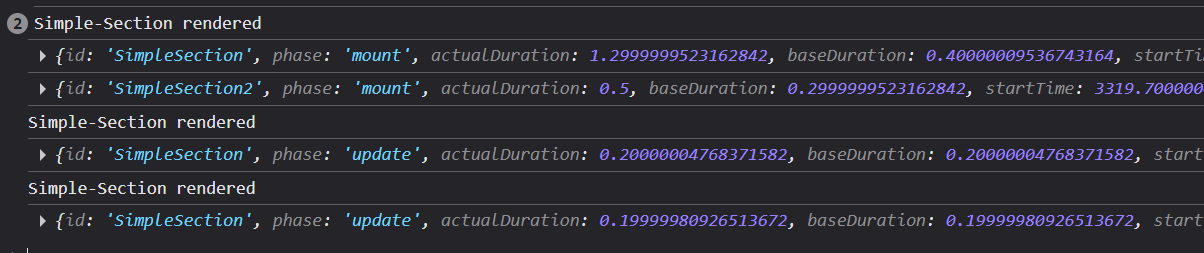
Another thing to note is that onRender function also does not execute when React compiler is used.
A fair warning:
This demo was done in react-dev mode and strict tag was also removed in main.tsx. This was done as Profiler component works by default in dev mode and for production build, it need manual actions.
Summary
One of the many features that React compiler provides is the memo logic that it handles under the hood if compiler is activated. This feature which originaly has to be manually added for each and every component in react, is now automatically applied and codebase is optimized. One less work for developer to do in reducing expensive re-renders.