React Design Pattern - Layout Part 1
How layout design pattern can help with resuability in React
Layout Pattern?
Whenever you are working on an enterprise project, there are lots of component, layouts and pages that needs to be developed. One can not go on hardcoding every page, every layout that page needs or every component which is being used on the page. Thats what React solves: Resuablility.
Resuablility is using same component on multiple places with having dynamic props. A same component may render only heading, paragraph and image while the same component may be used on another page without the image, just the heading and paragraph. That too with a different heading and paragraph text. This implementation is the most basic form of resuablilty. But it may also hit a boundry. One limitation is that what if we want to use the same component or layout but that data or component is dynamic. Lets look it through an example.
An Example
We have two data sets (authors and books) and corresponding component.
export const authors = [
  {
    id: "01",
    name: "Sarah",
    age: 55,
    country: "United Kingdom",
    books: ["Fingersmith", "The Night Watch"],
  },
  {
    id: "02",
    name: "Haruki",
    age: 35,
    country: "Japan",
    books: ["Norwegian Wood", "Kafka on the shore"],
  },
  {
    id: "03",
    name: "Chimmamda Nozgi",
    age: 43,
    country: "Nigeria",
    books: ["Half of Yellow Sun", "Americanah"],
  },
  {
    id: "04",
    name: "Adil",
    age: 25,
    country: "Pakistan",
    books: ["100 tales", "The Night Spin"],
  },
];

export const books = [
  {
    id: "01",
    name: "To kill a mocking bird",
    pages: 281,
    title: "Harper Lee",
    price: 12.99,
  },
  {
    id: "02",
    name: "The catcher in the Rye",
    pages: 244,
    title: "J.D Salinger",
    price: 9.99,
  },
  {
    id: "03",
    name: "The little prince",
    pages: 85,
    title: "Antonie de Saint-Exupery",
    price: 7.99,
  },
];
Here are the components:
import styles from "./styles.module.css";

export type AuthorSmallListItemProps = {
  author: {
    name: string;
    age: string;
  };
};

const AuthorSmallListItem = ({
  author: { age, name },
}: AuthorSmallListItemProps) => {
  return (
    <div className={styles.wrapper}>
      <p>
        Name: {name}, Age: {age}
      </p>
    </div>
  );
};

export default AuthorSmallListItem;import styles from "./styles.module.css";
type BookSmalListItemProps = {
book: {
name: string;
price: number;
};
};
const BookSmalListItem = ({ book: { name, price } }: BookSmalListItemProps) => {
return (
<div className={styles.wrapper}>
<h2>
{name} / {price}
</h2>
</div>
);
};
export default BookSmalListItem;The objective is that we need to show one component on one place and another component on another place via a common layout. This might not seem an issue, but just scale it up and imagine we need 30+ components flowing through a common layout. These 30+ components may have different content but are grouped under the same layout. In conventional way, the brute solution is to make use of indicative props and make use of if-else or any conditional logic. But talking of scale, it quickly and surely would turn into sphagetti code.
That means we need to come up with an optimized layout which without making use of if else can have a very generic layout.
The Layout Pattern
A simple solution is to come up with a generic layout which takes in dynamic props and components:
import styles from "./styles.module.css";

type RegularListLayoutProps = {
  heading: string;
  items: unknown[];
  sourceName: string;
  ItemComponent: React.ComponentType<any>;
};

const RegularListLayout = ({
  heading,
  items,
  sourceName,
  ItemComponent,
}: RegularListLayoutProps) => {
  return (
    <div>
      <h2 className={styles.mainHeading}>{heading}</h2>
      <div className={styles.wrapperList}>
        {items.map((item: unknown, idx: number) => {
          return <ItemComponent key={idx} {...{ [sourceName]: item }} />;
        })}
      </div>
    </div>
  );
};

export default RegularListLayout;
The ItemComponent is the main generic component here. Based on the data and components that we want to pass, we have a dynmic component and dynamic data, no need to hardcode the props. Plus as this is a layout, we can add any further details that we want to appear on the components e.g. heading.
import RegularListLayout from "../../layouts/RegularListsLayout";
import AuthorSmallListItem from "../../components/ListComponents/AuthorSmallListItem";
import AuthorLargeListItem from "../../components/ListComponents/AuthorLargeListItem";
import BookSmalListItem from "../../components/ListComponents/BookSmalListItem";
import BookLargeListItem from "../../components/ListComponents/BookLargeListItem";
import { authors, books } from "../../data";

const ListPage = () => {
  return (
    <div
      style={{
        display: "flex",
        flexDirection: "column",
        justifyContent: "center",
        alignItems: "center",
        gap: "1rem",
      }}
    >
      {/* ----------- Authors ------------- */}
      <RegularListLayout
        heading="Authors: Summary List"
        items={authors}
        sourceName="author"
        ItemComponent={AuthorSmallListItem}
      />

      {/* ----------- Books ------------- */}
      <RegularListLayout
        heading="Books: Summary List"
        items={books}
        sourceName="book"
        ItemComponent={BookSmalListItem}
      />
    </div>
  );
};

export default ListPage;
On ListPage and in RegularListLayout, we are doing multiple things:
- We are adding elements for common layout, e.g. a custom heading (which can be different for each component) is being added here in layout.
- We are passing dynamic data in items: for author component, we are passing data from author's array while for books we are passing data from book's array.
- We are also specificing which component we want to pass in the layout for the corresponding data. For example, for author data, we are passing AuthorSmallListItem while for books, we are passing BookSmalListItem. In the Item Component the dynamic data takes this form:
<ItemComponent key={idx} {...{ [sourceName]: item }} />The above component is behaving as following components based on data being passed:
<AuthorSmallListItem key={idx} author={item} /><BookSmalListItem key={idx} books={item} />This pattern has advantage on scale with multiple components. For example:
import RegularListLayout from "../../layouts/RegularListsLayout";
import AuthorSmallListItem from "../../components/ListComponents/AuthorSmallListItem";
import AuthorLargeListItem from "../../components/ListComponents/AuthorLargeListItem";
import BookSmalListItem from "../../components/ListComponents/BookSmalListItem";
import BookLargeListItem from "../../components/ListComponents/BookLargeListItem";
import { authors, books } from "../../data";

const ListPage = () => {
  return (
    <div
      style={{
        display: "flex",
        flexDirection: "column",
        justifyContent: "center",
        alignItems: "center",
        gap: "1rem",
      }}
    >
      {/* ----------- Authors ------------- */}
      <RegularListLayout
        heading="Authors: Summary List"
        items={authors}
        sourceName="author"
        ItemComponent={AuthorSmallListItem}
      />

      <RegularListLayout
        heading="Authors: Expanded List"
        items={authors}
        sourceName="author"
        ItemComponent={AuthorLargeListItem}
      />

      {/* ----------- Books ------------- */}
      <RegularListLayout
        heading="Books: Summary List"
        items={books}
        sourceName="book"
        ItemComponent={BookSmalListItem}
      />

      <RegularListLayout
        heading="Books: Expanded List"
        items={books}
        sourceName="book"
        ItemComponent={BookLargeListItem}
      />
    </div>
  );
};

export default ListPage;
And the result on page is:
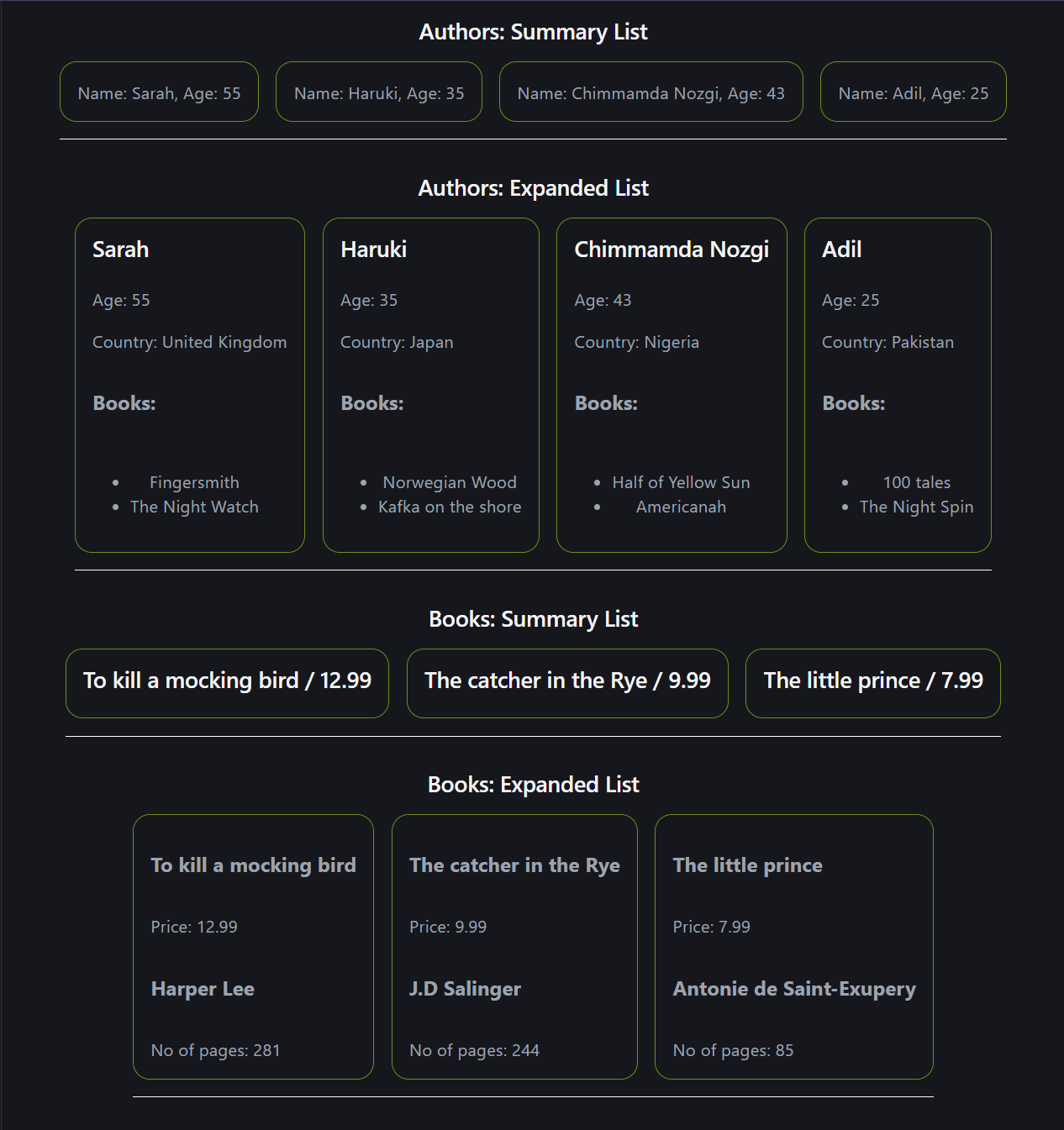
Multiple different components passing thorugh a single layout and avoiding multiple if elses or any conditional logics.
Summary
Layout pattern can solve multiple dynamic components within the same layout. It avoids conditional logics and props dictates which component to render, making code clean and explicit.