React Hooks - useLayoutEffect
The comparison between useEffect and useLayoutEffect
UseEffect and useLayoutEffect
UseEffect is as common in React as JSX. Most of the time, any dynamic logic like fetching data from APIs, are fed into useEffect and for good reason as well. For most of the time, useEffect is enough, no need to investigate further. But it does have its limitation for various reasons but today, we are exploring reason for avoiding it when it comes to screen flickers or painting UI. The other seldom used hook is useLayoutEffect hook. UseLayoutEffect hook is somewhat similar to useEffect but its place in react lifecycle is completely different.
React lifecycle
In react lifecycle, these both hooks are run at different time:
- React renders JSX → calculates changes (virtual DOM)
- React commits changes → updates the real DOM
- useLayoutEffect runs here (synchronously)
- Browser paints (user sees UI)
- useEffect runs here (async)
This simply means that useLayoutEffect runs before browser paints and before useEffect runs. Any effect which is dependent on previous effect can be executed via this hook.
UseLayoutEffect is a version of useEffect that fires before the browser repaints the screen.
Lets understand it with an example:
import { useEffect, useLayoutEffect, useState } from "react";

const RenderingUseEffect = () => {
  const [count, setCount] = useState(0);

  console.log("Run 1");

  useEffect(() => {
    console.log("Run 2");
  }, [count]);

  useLayoutEffect(() => {
    console.log("Run 3");
  }, [count]);

  console.log("Run 4");

  return (
    <div>
      <h1>Count: {count}</h1>

      <button onClick={() => setCount(count + 1)}>Click it</button>
    </div>
  );
};

export default RenderingUseEffect;
It is a simple counter which gets updated on button click. For initial render, how console logs would run?
The order is:
- Run 1
- Run 4
- Run 3
- Run 2
And it explains the logic. Initially, all the consoles outside any hooks runs from top to bottom, hence, Run-1 and Run-4. Then hooks run but first useLayoutEffect runs and then useEffect runs. This is the crucial difference and therefore it dictates our usecases.
UseLayoutEffect is synchronous and blocking while useEffect is non-synchronous and non-blocking.
Having this understanding, lets take an example to understand where it can be useful. The below code shows a box which is displayed when a button is clicked:
import { useEffect, useRef, useState } from "react";

const RenderingUseEffect = () => {
  const [show, setShow] = useState(false);
  const [top, setTop] = useState(0);
  const buttonRef = (useRef < HTMLButtonElement) | (null > null);

  const slowDown = () => {
    const now = performance.now();
    while (now > performance.now() - 500) {
      // Doing something...
    }
  };

  useEffect(() => {
    if (buttonRef.current === null || !show) {
      return setTop(0);
    }

    const { bottom } = buttonRef.current.getBoundingClientRect();
    setTop(bottom + 30);
  }, [show]);

  // Performance Reducing Block
  slowDown();

  return (
    <div style={{ position: "relative" }}>
      <p style={{ margin: "1rem auto", maxWidth: "60%" }}>
        UseEffect: With useEffect, the box flickers: it first appears on top as
        top is at zero. Then the position is calculated and layout is repainted
        and hence the box is shown at bottom.
      </p>

      <button
        style={{
          padding: "0.5rem 1rem",
          backgroundColor: "white",
          color: "black",
          fontSize: "1rem",
          fontWeight: "500",
          borderRadius: "0.5rem",
          border: "none",
        }}
        ref={buttonRef}
        onClick={() => setShow((prev) => !prev)}
      >
        Show
      </button>

      {show && (
        <div
          style={{
            top: `${top}px`,
            position: "absolute",
            border: "1px solid black",
            background: "white",
          }}
        >
          Some text...
        </div>
      )}
    </div>
  );
};

export default RenderingUseEffect;
The problem with this code is that initially "Some text..." block is hidden. When button is clicked to show it, it shows the block but before it can be seen, its position is calculated based on absolute positioning. Normally, we develop components so that elements within a component is fluid and arranges itself as per container. But in this use case, we want absolute positioning and hence want to calculate the exact position i.e. 30px below. When component is loaded and is interacted, we see a flicker.
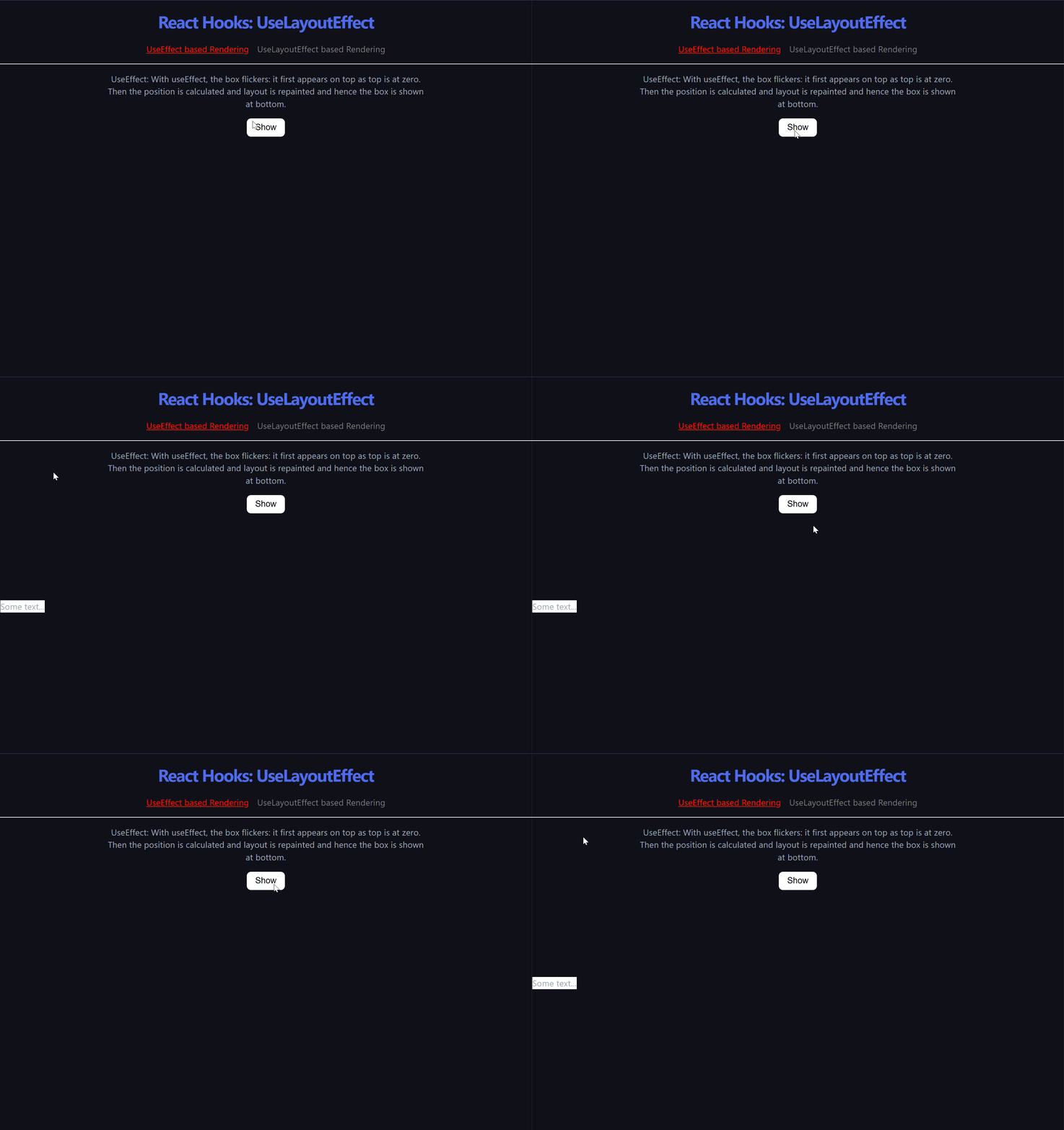
Lets revamp this example and make use of useLayoutEffect:
import { useLayoutEffect, useRef, useState } from "react";

const RenderingUseLayoutEffect = () => {
  const [show, setShow] = useState(false);
  const [top, setTop] = useState(0);
  const buttonRef = (useRef < HTMLButtonElement) | (null > null);

  const slowDown = () => {
    const now = performance.now();
    while (now > performance.now() - 500) {
      // Doing something...
    }
  };

  useLayoutEffect(() => {
    if (buttonRef.current === null || !show) {
      return setTop(0);
    }

    const { bottom } = buttonRef.current.getBoundingClientRect();
    setTop(bottom + 30);
  }, [show]);

  // Performance Reducing Block
  slowDown();

  return (
    <div style={{ position: "relative" }}>
      <p style={{ margin: "1rem auto", maxWidth: "60%" }}>
        UseLayoutEffect: With useLayoutEffect, the temporary flicker of box
        first appearing on top and then at bottom is not shown. Rather, the
        final position is calculated and then UI is painted.
      </p>

      <button
        style={{
          padding: "0.5rem 1rem",
          backgroundColor: "white",
          color: "black",
          fontSize: "1rem",
          fontWeight: "500",
          borderRadius: "0.5rem",
          border: "none",
        }}
        ref={buttonRef}
        onClick={() => setShow((prev) => !prev)}
      >
        Show
      </button>

      {show && (
        <div
          style={{
            top: `${top}px`,
            position: "absolute",
            border: "1px solid black",
            background: "white",
          }}
        >
          Some text...
        </div>
      )}
    </div>
  );
};

export default RenderingUseLayoutEffect;
Only useEffect is replaced with useLayoutEffect. Moreover, the system is artifically slowed down with a slowdown function so that effects are noticable. Replacing hook does not change the actual time for the block to render, it just skips the middle stage where is renders at position zero before calculation. Why skip? because in lifecycle, painting is not done until this hook is run. In a way, we hijack the final painting, do our calcualtion what is needed, and then paint the UI. Below is the effect:
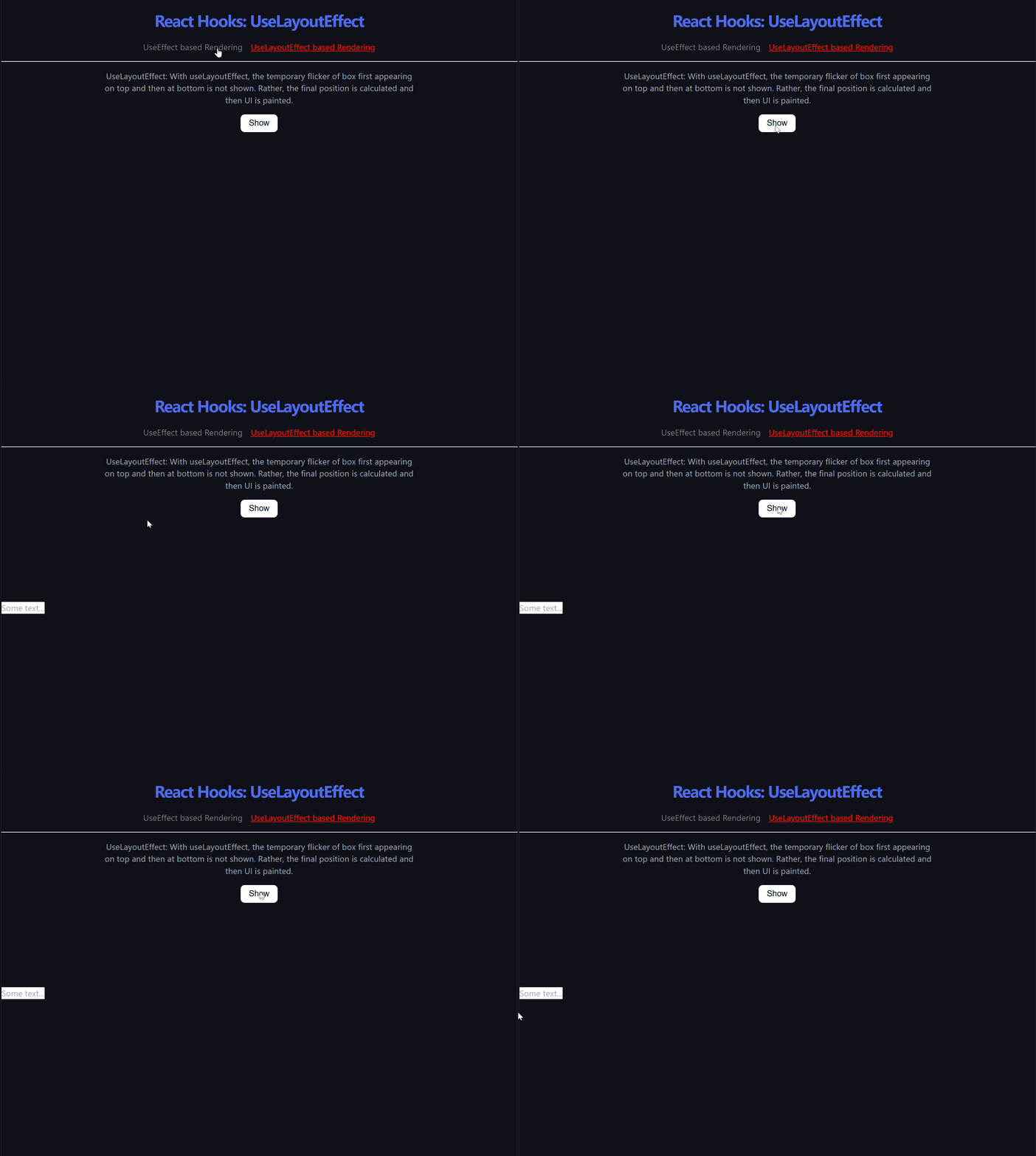
But this hook is blocking i.e. it means it can stop rendering process until every code inside this hook is run (the reason why fetch is not used in this hook, but in useEffect). This hook has limitations and some caveates attached to it:
Caveats with useLayoutEffect
- Rendering in two passes and blocking the browser hurts performance. Try to avoid this when you can.
- The code inside useLayoutEffect and all state updates scheduled from it block the browser from repainting the screen. When used excessively, this makes your app slow. When possible, prefer useEffect.
- Effects only run on the client. They don’t run during server rendering.
- If you trigger a state update inside useLayoutEffect, React will execute all remaining Effects immediately including useEffect.