React Parent Passing Prop
How data can be transferred from parent to child in react
Parent-Child Relationship
React follows componsition model and hence results in inverted tree like structure. React thinking is thinking in terms of components and these components are linked with each other as per business requirements. But the most important thing is: Components talk. They talk with each other and pass relevant data that is needed by other component.
The data transfer between different components, specially between parent and child, is the main topic.
Simple Parent-Child Relationship
In simple relationship, the child is nested inside parent and and data, whether the state data or any data got via side-effect (i.e. data from api in useEffect) is simply passed to children via props. That simple. No complication. And this is mostly the way the components are architected. But sometime, the relation is not so simple. The particular case is when child is not nested or is not the only logical child of the parent. For example, lets say there are multiple children of a single parent. And the children are rendered as tab-children.
This case is common in many react applications where different routes are used for different children for the same component. Let explore an example:
Example 1
Lets say wwe have a parent and then there are two components which are rendered one at a time.
import { useState } from "react";
import { NavLink, Outlet } from "react-router";
import styles from "./styles.module.css";

const Parent = () => {
  const [randomState, setRandomState] = useState < number > 0;

  return (
    <div className={styles.wrapper}>
      <h1 className={styles.heading}>Use-Context Page</h1>
      <p className={styles.stateStat}>Current Parent State: {randomState}</p>

      <div className={styles.btnLink}>
        <NavLink to="/outlet-context/comp1">Component 1</NavLink>
        <NavLink to="/outlet-context/comp2">Component 2</NavLink>
      </div>

      <Outlet />
    </div>
  );
};

export default Parent;
And router config is:
import { createBrowserRouter, Navigate } from "react-router";

const AppRouter = createBrowserRouter([
  {
    path: "/",
    Component: App,
  },
  {
    path: "/parent",
    Component: Parent,
    children: [
      { index: true, element: <Navigate to="comp1" replace /> },
      { path: "comp1", Component: BasicComponentOne },
      { path: "comp2", Component: BasicComponentTwo },
    ],
  },
]);

export default AppRouter;
Now as can be seen in the setup, there are two children which would be rendered as per the tab that is clicked. Now data needs to be passed between parent and children. The data that needs to be passed is simple counter data. But how to pass data across Outlet boundry? This is a classical case of React. The solution: useOutletContext from React-Router
The changed solution in parent and in child components is as follows:
import { useState } from "react";
import { NavLink, Outlet } from "react-router";
import styles from "./styles.module.css";

const OutletContextPage = () => {
  const [randomState, setRandomState] = useState < number > 0;

  return (
    <div className={styles.wrapper}>
      <h1 className={styles.heading}>Use-Context Page</h1>
      <p className={styles.stateStat}>Current Parent State: {randomState}</p>

      <div className={styles.btnLink}>
        <NavLink
          to="/outlet-context/comp1"
          className={({ isActive, isPending }) =>
            `${styles.link} ${
              isPending ? styles.pending : isActive ? styles.active : ""
            }`
          }
        >
          Component 1
        </NavLink>

        <NavLink
          to="/outlet-context/comp2"
          className={({ isActive, isPending }) =>
            `${styles.link} ${
              isPending ? styles.pending : isActive ? styles.active : ""
            }`
          }
        >
          Component 2
        </NavLink>
      </div>

      <hr className={styles.divider} />
      <Outlet context={{ randomState, setRandomState }} />
    </div>
  );
};

export default OutletContextPage;import { useOutletContext } from "react-router";
import styles from "./styles.module.css";
type ComponentContextState = {
randomState: number;
setRandomState: (value: number | ((prev: number) => number)) => void;
};
const BasicComponentOne = () => {
const { randomState, setRandomState } =
useOutletContext<ComponentContextState>();
const increaseCounter = () => {
setRandomState((prev: number) => prev + 1);
};
const decreaseCounter = () => {
setRandomState((prev: number) => prev - 1);
};
return (
<div className={styles.wrapper}>
<button className={styles.btnComp} onClick={decreaseCounter}>
-1
</button>
<h3>State-value in Child Component-One: {randomState}</h3>
<button className={styles.btnComp} onClick={increaseCounter}>
+1
</button>
</div>
);
};
export default BasicComponentOne;import { useOutletContext } from "react-router";
import styles from "./styles.module.css";
type ComponentContextState = {
randomState: number;
setRandomState: (value: number | ((prev: number) => number)) => void;
};
const BasicComponentTwo = () => {
const { randomState, setRandomState } =
useOutletContext<ComponentContextState>();
const increaseCounter = () => {
setRandomState((prev: number) => prev + 2);
};
const decreaseCounter = () => {
setRandomState((prev: number) => prev - 2);
};
return (
<div className={styles.wrapper}>
<button className={styles.btnComp} onClick={decreaseCounter}>
-2
</button>
<h3>State-value in Child Component-Two: {randomState}</h3>
<button className={styles.btnComp} onClick={increaseCounter}>
+2
</button>
</div>
);
};
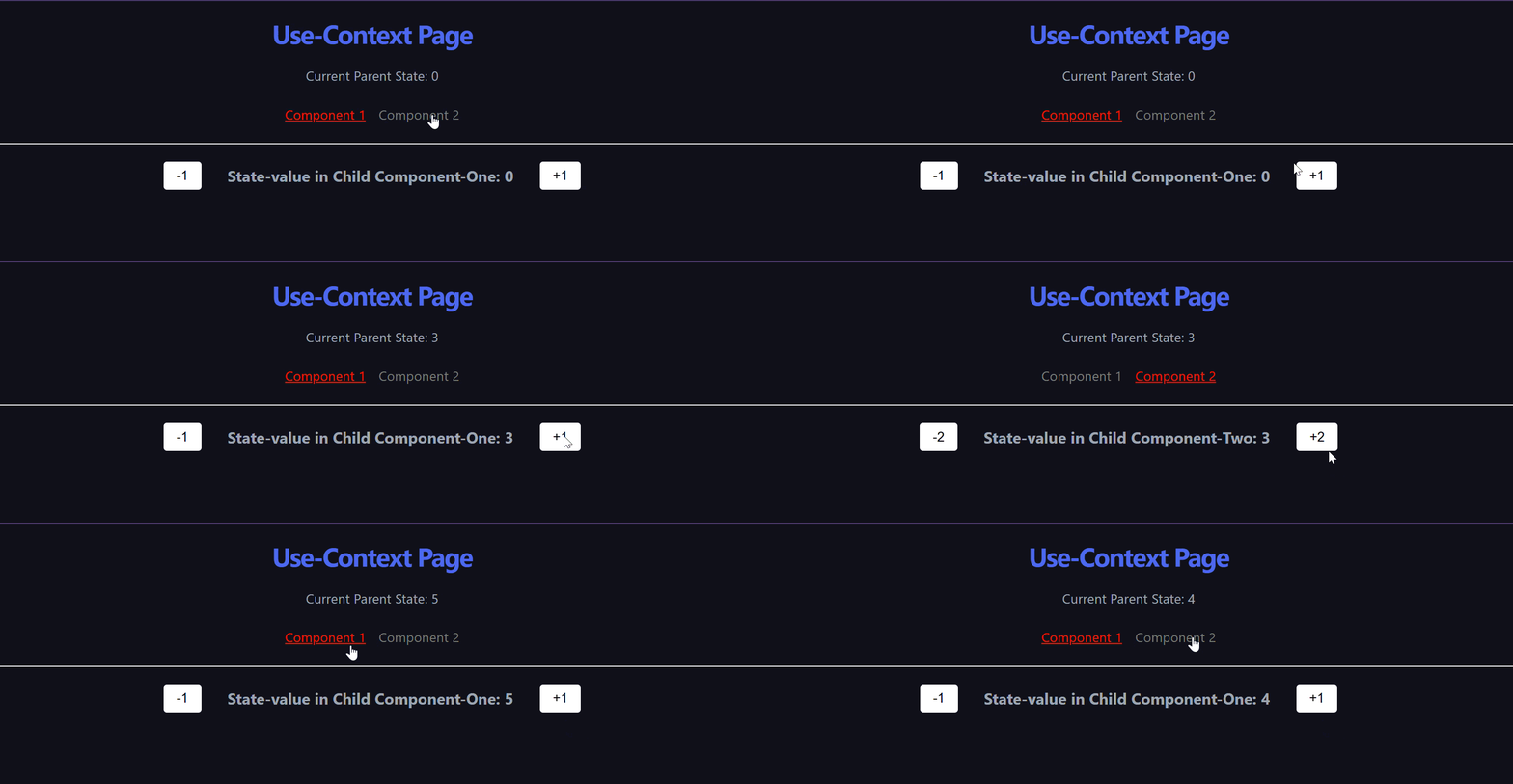
export default BasicComponentTwo;Here the main tool to use is the hook from react-router: useOutletContext. This hook captures any prop passed from Outlet and uses this hook to relay the information to child component. Moreover, state is also preserved as state is being managed in parent component.
Here is how component is behaving:
Example 2
Now lets say you are not using Outlet situation and rendering component in the conventional way.
import { useState } from "react";
import { NavLink, Outlet } from "react-router";
import styles from "./styles.module.css";

const Parent = () => {
  const [tab, setTab] = useState("tab-1");

  return (
    <div className={styles.wrapper}>
      <h1 className={styles.heading}>Parent Page</h1>

      <div className={styles.btnLink}>
        <button onClick={setTab("tab-1")}>Tab 1</button>
        <button onClick={setTab("tab-2")}>Tab 2</button>
      </div>

      {tab === "tab-1" && <ComponentOne />}
      {tab === "tab-2" && <ComponentTwo />}
    </div>
  );
};

export default Parent;
In this way, when user clicks the button, the subsection is rendered as per tab clicked. It is similar to what was being done above but now there is a small change: nothing is being passed from parent to children. Technically you can pass data but the objective is that when tabs are clicked, any local state is saved without lifting it up to its parent. Each child has its own state which it is managing. But the problem is that when tabs are switched, components are unmounted and any state which as local to child component is lost. The objective is that we want to preserve that state. The answer is: Activity component.
This component is now stable part of React 19 and used for this use case. It works by hiding the component (i.e. display is set to none with important tag so that nothing is overriding it). Our component is revamped making use of Activity component:
import { useState } from "react";
import { NavLink, Outlet } from "react-router";
import styles from "./styles.module.css";

const Parent = () => {
  const [tab, setTab] = useState("tab-1");

  return (
    <div className={styles.wrapper}>
      <h1 className={styles.heading}>Parent Page</h1>

      <div className={styles.btnLink}>
        <button onClick={setTab("tab-1")}>Tab 1</button>
        <button onClick={setTab("tab-2")}>Tab 2</button>
      </div>

      <Activity mode={tab === "tab-1" ? "visible" : "hidden"}>
        <ComponentOne />
      </Activity>
      <Activity mode={tab === "tab-2" ? "visible" : "hidden"}>
        <ComponentTwo />
      </Activity>
    </div>
  );
};

export default Parent;
If some state data needs to be passed from the parent to children, this is passed like simple conventional way: via props. No complication there. The main advnatge of using this component is that component is not unmounted, just hidden with changing css property display. Therefore any state local to children component is preserved when switching tabs.
Summary
As can be seen above, the state is being managed in parent state but that data is transfered to children and in normal circumstances, nested children would get props but as here the boundry layer is Outlet, useOutletContext is used for receiving the props passed in Outlet.
If outlet from react router is not being used, Activity component can be used in cases where local state needs to be preserved.